
Practical exam (ECF) of the Titre Professionnel Technicien Supérieur Systèmes et Réseaux (TSSR, RNCP level 5), January 2026.
The brief#
The exam describes a fictional design studio, CreativeFusion Studios. Its problems are very ordinary ones: every application has its own passwords, support requests get lost between emails and phone calls, and all departments share one flat network. My job was to fix that, then prove every step with timestamped screenshots.
The original exam report isn’t published. Every screenshot on this page comes from it, and every command or configuration file is transcribed from those screenshots, with nothing added. When I corrected something afterwards, I say so.
| # | Mission | Tools |
|---|---|---|
| 1 | Create the company domain | Windows Server 2022, AD DS, DNS |
| 2 | One DHCP scope per department | Windows DHCP |
| 3 | Ticketing server for user support | Debian 13, Apache, PHP-FPM 8.4, MariaDB, GLPI 11 |
| 4 | Log in to GLPI with domain accounts | LDAP, AD service account |
| 5 | Segment the network, route between VLANs | Cisco Packet Tracer, 2960 + 2901 |
| 6 | Back up switch and router configs | IOS copy running-config ftp: |
| 7 | Stop users from setting static IPs | GPO, PowerShell startup script |
Machines and network#
RFC 1178 recommends naming machines after a theme rather than their role. I picked Norse mythology: for someone heading north, it seemed fitting.
| Host | Role | OS | IP |
|---|---|---|---|
| MIDGARD | Domain controller, DNS, DHCP | Windows Server 2022 | 10.0.60.1 (static) |
| YGGDRASIL | GLPI server (no GUI) | Debian 13 | 10.0.60.2 (static) |
| THOR | Test workstation joined to the domain | Windows 10 | DHCP |
Missions 1–4 and 7 ran on VMware virtual machines, missions 5–6 in Cisco Packet Tracer.
Six departments, one VLAN and one /24 each. The gateway is always the last usable address (.254), and every scope hands out MIDGARD as DNS server.
| VLAN | Department | Network | Gateway |
|---|---|---|---|
| 10 | RH (HR) | 10.0.10.0/24 | 10.0.10.254 |
| 20 | Comptabilité (Accounting) | 10.0.20.0/24 | 10.0.20.254 |
| 30 | Informatique (IT) | 10.0.30.0/24 | 10.0.30.254 |
| 40 | Direction (Management) | 10.0.40.0/24 | 10.0.40.254 |
| 50 | Design | 10.0.50.0/24 | 10.0.50.254 |
| 60 | Serveurs (Servers) | 10.0.60.0/24 | 10.0.60.254 |
flowchart LR
    R["Router0 · Cisco 2901
Gi0/0.10 … Gi0/0.60
gateways .254 + ip helper"]
    S["Switch0 · Cisco 2960"]
    R ---|"802.1Q trunk
Gi0/0 ↔ Fa0/1"| S
    S ---|"Fa0/2 · VLAN 50"| D["PC0 · Design"]
    S ---|"Fa0/3 · VLAN 40"| DG["PC1 · Direction"]
    S ---|"Fa0/4 · VLAN 30"| I["PC2 · Informatique"]
    S ---|"Fa0/5 · VLAN 20"| C["PC3 · Comptabilité"]
    S ---|"Fa0/6 · VLAN 10"| H["PC4 · RH"]
    S ---|"Fa0/7 · VLAN 60"| M["MIDGARD · 10.0.60.1
DHCP + FTP"]
1 · Active Directory domain#
Need. One place to manage accounts and access: a new domain, CreativeFusion-Studios.eu, on Windows Server 2022, with a server name that follows RFC 1178.
What I did
- Installed Windows Server 2022 and renamed it MIDGARD.
- Gave it a static address:
10.0.60.1/24, gateway10.0.60.254. - Added the AD DS role, then promoted the server to domain controller of a new forest,
CreativeFusion-Studios.eu, with the integrated DNS server. - Organised the directory before creating anything, following the company org chart:
CreativeFusion-Studios.eu
├── 00_GROUPES
├── 01_ADMIN
│   └── Comptes_techniques      ← Sync_GLPI, service account used by GLPI (mission 4)
├── 02_COMPTABILITE
├── 03_DESIGN_ANIMATION
│   ├── PERSONNEL
│   └── POSTES                  ← THOR lives here, target of the GPO (mission 7)
├── 04_DIRECTION
│   ├── PERSONNEL
│   └── POSTES
├── 05_INFORMATIQUE
│   ├── PERSONNEL
│   └── POSTES
├── 06_RH
│   ├── PERSONNEL
│   └── POSTES
└── 07_SERVEURS
Keeping people (PERSONNEL) and computers (POSTES) apart in each department pays off later: a GPO for computers can be linked to a POSTES OU without touching user accounts.
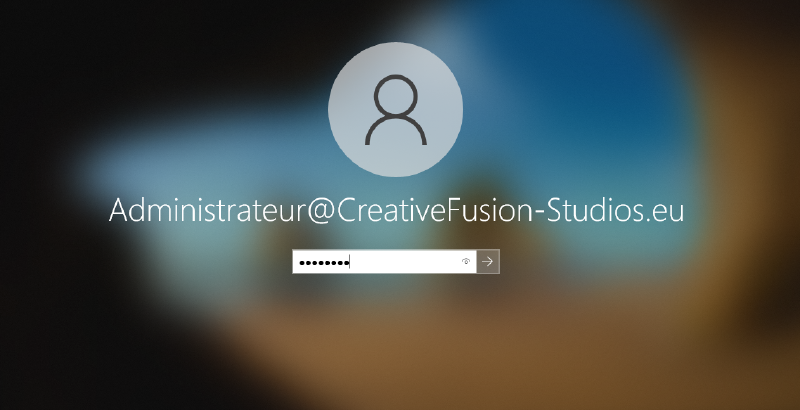
How I checked it. nslookup midgard resolves midgard.CreativeFusion-Studios.eu to 10.0.60.1. The Windows 10 client THOR joined the domain, and the domain administrator account opens a session on it.
2 · DHCP scopes#
Need. Each department gets its own network and DHCP scope. The gateway is the last usable address of each network, the AD server keeps a static address, and every scope hands out the AD/DNS server as DNS.
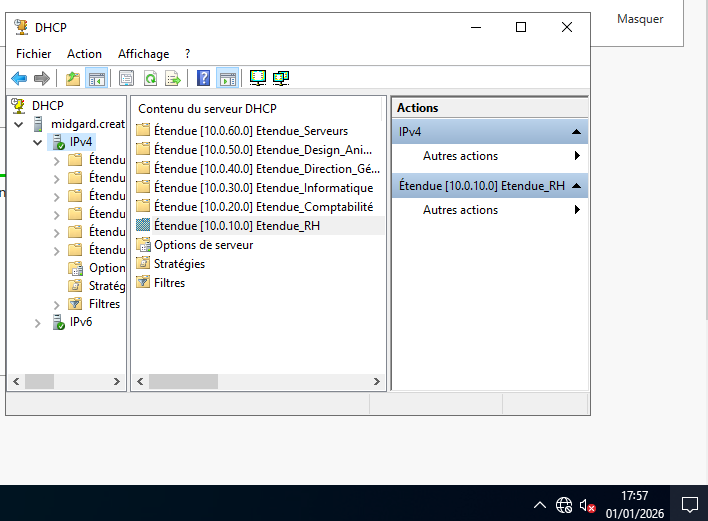
What I did. Added the DHCP role on MIDGARD, completed its post-install configuration, then created six scopes:
| Scope | Network | Router (option 003) | DNS (option 006) |
|---|---|---|---|
| Etendue_RH | 10.0.10.0/24 | 10.0.10.254 | 10.0.60.1 |
| Etendue_Comptabilité | 10.0.20.0/24 | 10.0.20.254 | 10.0.60.1 |
| Etendue_Informatique | 10.0.30.0/24 | 10.0.30.254 | 10.0.60.1 |
| Etendue_Direction_Générale | 10.0.40.0/24 | 10.0.40.254 | 10.0.60.1 |
| Etendue_Design_Animation | 10.0.50.0/24 | 10.0.50.254 | 10.0.60.1 |
| Etendue_Serveurs | 10.0.60.0/24 | 10.0.60.254 | 10.0.60.1 |
Example range, for accounting: 10.0.20.1 → 10.0.20.253. .254 stays out because it belongs to the gateway.
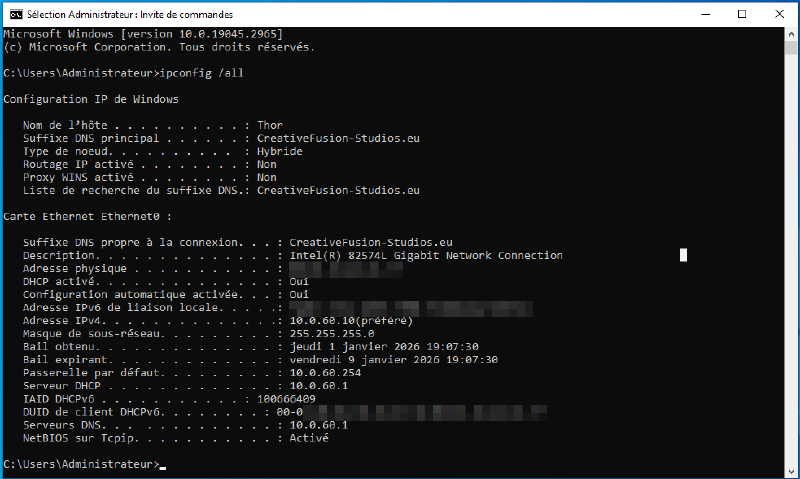
How I checked it. On THOR, ipconfig /all shows a lease from MIDGARD with the right gateway and DNS. THOR sits in the servers network, so its lease comes from Etendue_Serveurs. Clients in the other departments only reach the server through a DHCP relay across VLANs: that part is done in mission 5.
3 · GLPI ticketing server#
Need. Support requests arrive by email and phone: nothing is tracked, and there are no resolution-time metrics. The company chose GLPI, on a Debian server without a graphical interface, in the servers network.
Server. Debian 13 “trixie” (the brief asked for Debian 12, but 13 was the current stable release), hostname YGGDRASIL, static address 10.0.60.2/24.
Web stack — commands as typed, in order:
sudo apt update && sudo apt upgrade -y
sudo apt install apache2 -y
sudo apt install php -y
sudo apt-get install php-fpm mariadb-server
sudo apt-get install php-{curl,gd,intl,mysql,zip,bcmath,mbstring,xml,bz2}
sudo apt install php-ldap                 # needed later for AD authentication
Database. A dedicated account limited to the GLPI database, rather than root:
sudo mariadb-secure-installation          # switched root to unix_socket authentication
sudo mysql -u root -p
CREATE DATABASE db1_glpi;
GRANT ALL PRIVILEGES ON db1_glpi.* TO glpi_adm@localhost IDENTIFIED BY '********';
FLUSH PRIVILEGES;GLPI 11.0.4. The brief asked for 10.0.10 minimum. I took the current release, which runs on the PHP 8.4 shipped with Debian 13.
cd /tmp
wget https://github.com/glpi-project/glpi/releases/download/11.0.4/glpi-11.0.4.tgz
sudo tar -xzvf glpi-11.0.4.tgz -C /var/www/
Config, data and logs out of the web root. By default they sit under /var/www/glpi. Moving them means a misconfiguration can never expose them over HTTP.
sudo chown www-data /var/www/glpi/ -R
sudo mkdir /etc/glpi
sudo chown www-data /etc/glpi/
sudo mv /var/www/glpi/config /etc/glpi
sudo mkdir /var/lib/glpi
sudo chown www-data /var/lib/glpi/
sudo mv /var/www/glpi/files/ /var/lib/glpi
sudo mkdir /var/log/glpi
sudo chown www-data /var/log/glpi
GLPI is then told where to look:
<?php
// /var/www/glpi/inc/downstream.php
define('GLPI_CONFIG_DIR', '/etc/glpi/');
if (file_exists(GLPI_CONFIG_DIR . '/local_define.php')) {
        require_once GLPI_CONFIG_DIR . '/local_define.php';
}<?php
// /etc/glpi/local_define.php
define('GLPI_VAR_DIR', '/var/lib/glpi/files');
define('GLPI_LOG_DIR', '/var/log/glpi');Apache + PHP-FPM. A dedicated virtual host whose document root is only /var/www/glpi/public:
/etc/apache2/sites-available/support-creative-fusion-studios.eu.conf
<VirtualHost *:80>
        ServerName support-creative-fusion-studios.eu
        DocumentRoot /var/www/glpi/public

        <Directory /var/www/glpi/public>
                Require all granted

                RewriteEngine On

                #ensure authorization headers are passed to PHP.
                #Some apache configurations may filter them and break usage of API, CalDAV...

                RewriteCond %{HTTP:Authorization} ^(.+)$
                RewriteRule .* - [E=HTTP_AUTHORIZATION:%{HTTP:Authorization}]

                #redirect all request to GLPI router, unless file exists.

                RewriteCond %{REQUEST_FILENAME} !-f
                RewriteRule ^(.*)$ index.php [QSA,L]

        </Directory>

        <FilesMatch \.php$>
                SetHandler "proxy:unix:/run/php/php8.4-fpm.sock|fcgi://localhost/"
        </FilesMatch>
</VirtualHost>
sudo a2ensite support-creative-fusion-studios.eu.conf
sudo a2dissite 000-default.conf
sudo a2enmod proxy_fcgi setenvif
sudo a2enconf php8.4-fpm
sudo systemctl restart apache2PHP session hardening, in /etc/php/8.4/fpm/php.ini:
session.cookie_httponly = on      ; cookie not readable by JavaScript (limits session theft through XSS)
session.cookie_samesite = Lax     ; cookie not sent on cross-site sub-requests (CSRF mitigation)
Web installer, run from a browser on the network (http://10.0.60.2), then:
sudo rm /var/www/glpi/install/install.phpLast step: changed the password of the default glpi super-admin account.
How I checked it. systemctl status apache2 → active (running) after each change, ip a → 10.0.60.2/24, and the GLPI dashboard reachable from the network.
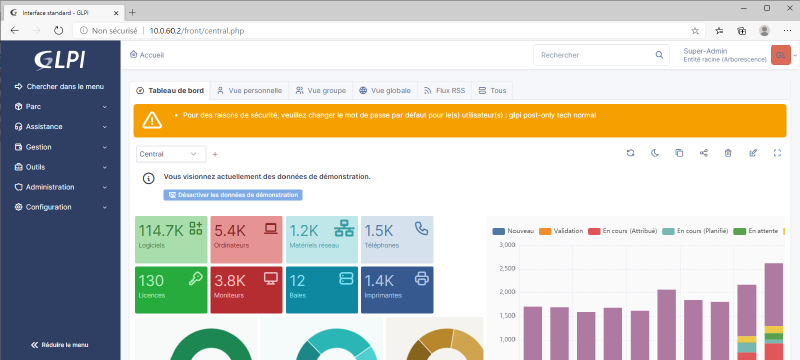
post-only, tech, normal) still had their default passwords. See what I would harden.4 · GLPI authentication against Active Directory#
Need. Users log in to GLPI with their domain account, not a separate GLPI password.
What I did. A service account in AD, Sync_GLPI, in 01_ADMIN/Comptes_techniques. GLPI only uses it to read the directory, so no administrator credentials are stored on the GLPI server. Then a new LDAP directory in GLPI (Setup → Authentication → LDAP directories):
| Field | Value |
|---|---|
| Server / port | 10.0.60.1 / 389 |
| Connection filter | (&(objectCategory=person)(objectClass=user)) |
| BaseDN | DC=creativefusion-studios,DC=eu |
| Bind account | CN=Sync_GLPI,OU=Comptes_techniques,OU=01_ADMIN,DC=creativefusion-studios,DC=eu |
| Login field | samaccountname |
| Synchronisation field | objectguid |
objectguid rather than the login: if a user is renamed in AD, GLPI still recognises the same person.
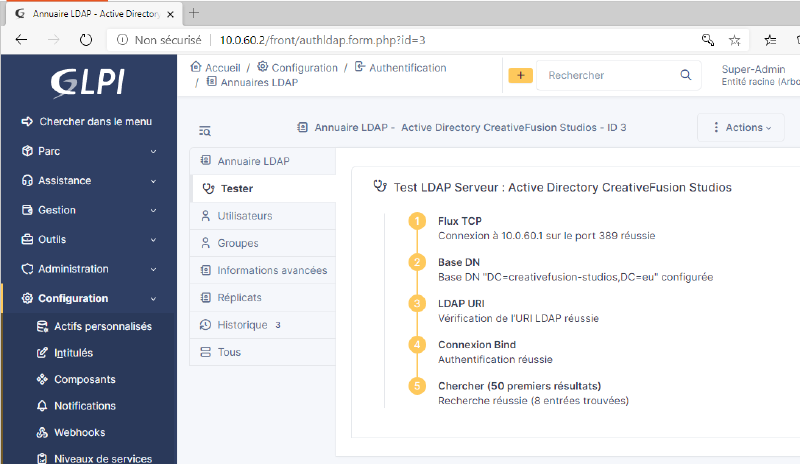
How I checked it. GLPI’s built-in test: TCP connection, BaseDN, bind and search all succeed (8 entries found).
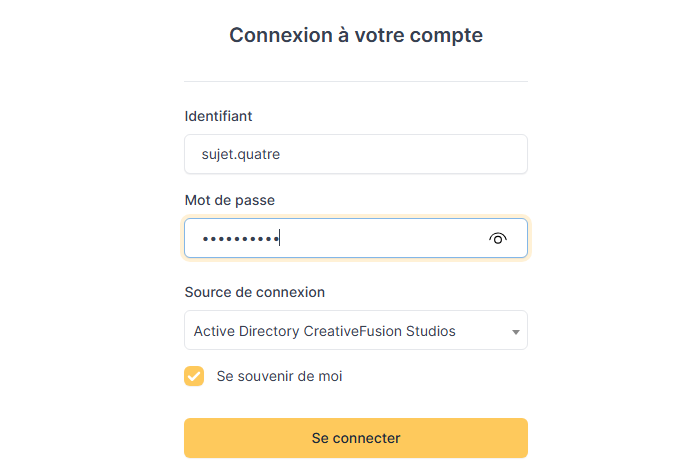
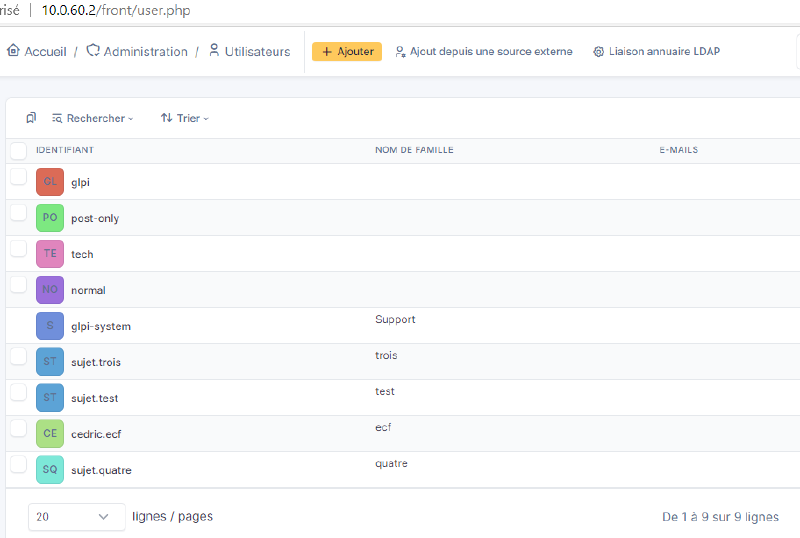
Then I created test users in AD, opened a session on THOR to set their password, and logged in to GLPI with the Active Directory source. The AD users then appear in GLPI’s user list.
5 · VLAN segmentation and inter-VLAN routing#
Need. Segment the network by department, while every workstation gets its address from the DHCP server and can still ping every other machine. That means routing between VLANs.
Built in Cisco Packet Tracer from the topology given in the brief: one 2960 switch, one 2901 router, one PC per department and the server.
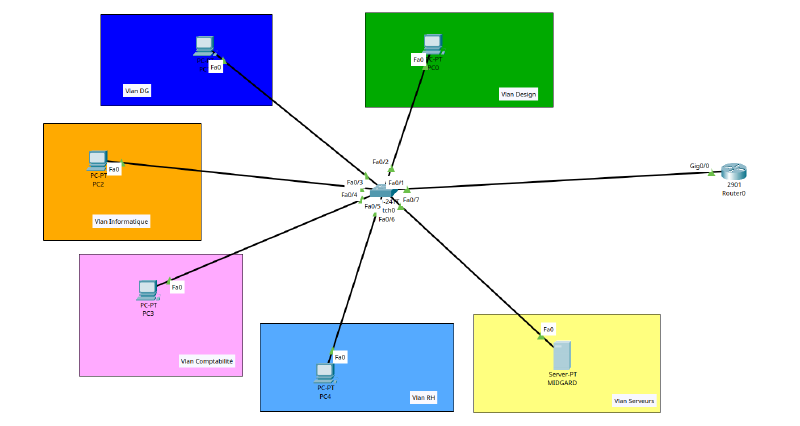
Switch. VLANs 10 to 60 named after the departments, one access port per VLAN (Fa0/2 → Fa0/7), and Fa0/1 as an 802.1Q trunk towards the router, allowing only VLANs 10–60.
Router. Router-on-a-stick: one physical link, one sub-interface per VLAN, each one being the gateway (.254) of its network.
interface gigabitEthernet 0/0.10
 encapsulation dot1Q 10
 ip address 10.0.10.254 255.255.255.0
DHCP across VLANs. DHCP requests are broadcasts and don’t cross a router. On each client sub-interface, ip helper-address 10.0.60.1 turns the broadcast into a unicast towards the server. VLAN 60 doesn’t need it: the server is already there.
Server (MIDGARD in Packet Tracer). Static 10.0.60.1, gateway 10.0.60.254, one DHCP pool per client VLAN (start .1, gateway .254, DNS 10.0.60.1). Every PC set to DHCP.
Switch0 — full command list
enable
configure terminal
vlan 10
 name RH
 exit
vlan 20
 name COMPTABILITE
 exit
vlan 30
 name INFORMATIQUE
 exit
vlan 40
 name DIRECTION
 exit
vlan 50
 name DESIGN
 exit
vlan 60
 name SERVEURS
 exit
interface fa0/2
 switchport mode access
 switchport access vlan 50
 exit
interface fa0/3
 switchport mode access
 switchport access vlan 40
 exit
interface fa0/4
 switchport mode access
 switchport access vlan 30
 exit
interface fa0/5
 switchport mode access
 switchport access vlan 20
 exit
interface fa0/6
 switchport mode access
 switchport access vlan 10
interface fa0/7
 switchport mode access
 switchport access vlan 60
 exit
interface fa0/1
 switchport mode trunk
 switchport trunk allowed vlan 10,20,30,40,50,60
 no shutdown
 exit
Router0 — full command list
enable
configure terminal
interface gigabitEthernet 0/0
 no shutdown
 exit
interface gigabitEthernet 0/0.10
 encapsulation dot1Q 10
 ip address 10.0.10.254 255.255.255.0
 ip helper-address 10.0.60.1
 exit
interface gigabitEthernet 0/0.20
 encapsulation dot1Q 20
 ip address 10.0.20.254 255.255.255.0
 ip helper-address 10.0.60.1
 exit
interface gigabitEthernet 0/0.30
 encapsulation dot1Q 30
 ip address 10.0.30.254 255.255.255.0
 ip helper-address 10.0.60.1
 exit
interface gigabitEthernet 0/0.40
 encapsulation dot1Q 40
 ip address 10.0.40.254 255.255.255.0
 ip helper-address 10.0.60.1
 exit
interface gigabitEthernet 0/0.50
 encapsulation dot1Q 50
 ip address 10.0.50.254 255.255.255.0
 ip helper-address 10.0.60.1
 exit
interface gigabitEthernet 0/0.60
 encapsulation dot1Q 60
 ip address 10.0.60.254 255.255.255.0
 exit
Grouped by sub-interface for readability: during the exam, the helper addresses were added in a second pass.
Verification — show vlan brief / show ip interface brief
Switch#show vlan brief
VLAN Name                             Status    Ports
---- -------------------------------- --------- ------------------------------
1    default                          active    Fa0/1, Fa0/8, Fa0/9, Fa0/10 …
10   RH                               active    Fa0/6
20   COMPTABILITE                     active    Fa0/5
30   INFORMATIQUE                     active    Fa0/4
40   DIRECTION                        active    Fa0/3
50   DESIGN                           active    Fa0/2
60   SERVEURS                         active    Fa0/7

Router#show ip interface brief
Interface              IP-Address      OK? Method Status                Protocol
GigabitEthernet0/0     unassigned      YES unset  up                    up
GigabitEthernet0/0.10  10.0.10.254     YES manual up                    up
GigabitEthernet0/0.20  10.0.20.254     YES manual up                    up
GigabitEthernet0/0.30  10.0.30.254     YES manual up                    up
GigabitEthernet0/0.40  10.0.40.254     YES manual up                    up
GigabitEthernet0/0.50  10.0.50.254     YES manual up                    up
GigabitEthernet0/0.60  10.0.60.254     YES manual up                    up
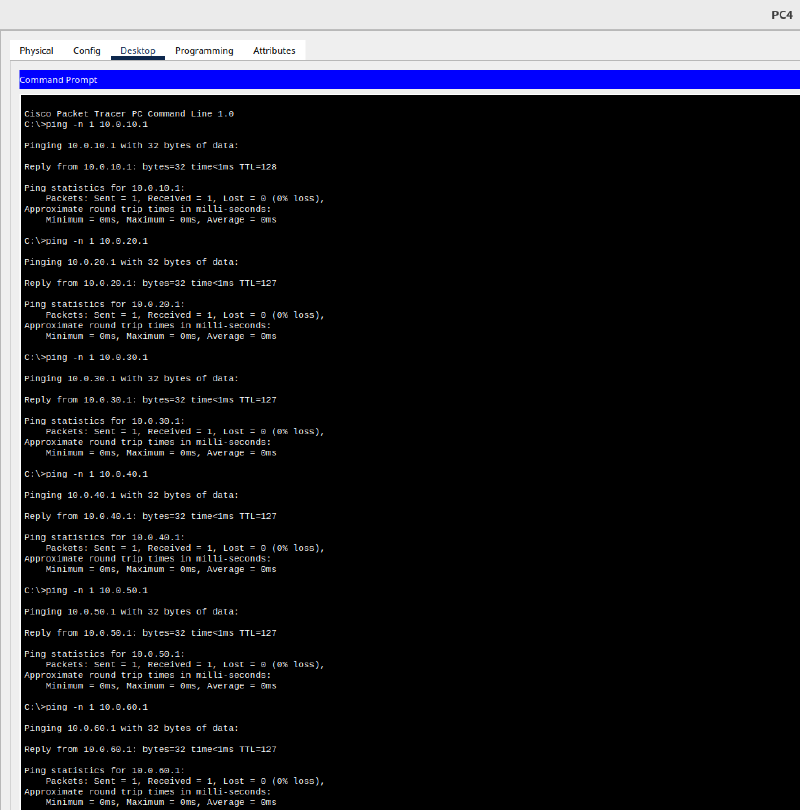
How I checked it. From each PC, one ping to every network (ping -n 1, to fit on one screenshot). From PC4 (HR), the TTL tells the story: 128 for the address in its own VLAN, 127 everywhere else, one hop through the router.
6 · Backing up network configs to FTP#
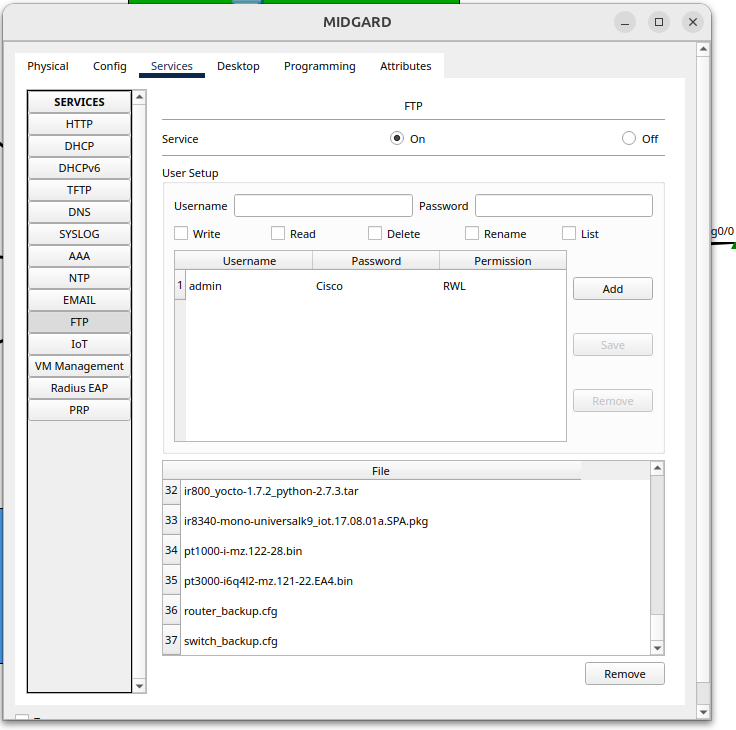
Need. Test saving the switch and router configurations to the FTP server, with the admin / Cisco account given in the brief.
Router. My first attempt put the credentials in the URL:
Router#copy running-config ftp://admin:Cisco@10.0.60.1/router_backup.cfg
% Invalid input detected at '^' marker.
Packet Tracer’s IOS doesn’t accept that syntax: the credentials have to be declared in the configuration first.
Router(config)#ip ftp username admin
Router(config)#ip ftp password Cisco
Router#copy running-config ftp:
Address or name of remote host []? 10.0.60.1
Destination filename [Router-confg]? router_backup.cfg
[OK - 1367 bytes]
Switch. Same commands, but the first copy failed:
%Error opening ftp://.../switch_backup.cfg (Timed out)A layer-2 switch has no IP address by default, so it couldn’t reach the FTP server at all. The fix: a management interface in the servers VLAN and a default gateway.
interface vlan 60
 ip address 10.0.60.2 255.255.255.0
 no shutdown
ip default-gateway 10.0.60.254
After that: [OK - 1592 bytes].
How I checked it. Both files are on the FTP server.
7 · GPO forcing DHCP at startup#
Need. A recurring ticket: users can’t log in with their domain account because some of them typed a static IP. The brief asks for a GPO that runs a PowerShell script at computer startup to put the network card back in DHCP mode.
What I did
- A security group,
G_DHCP_POSTES, with THOR as member. - The script, stored in SYSVOL so every domain computer can read it (
\\CreativeFusion-Studios.eu\SYSVOL\CreativeFusion-Studios.eu\scripts\):
# force_dhcp.ps1 — for every active adapter: DHCP on, manual DNS servers removed
Get-NetAdapter | Where-Object {$_.Status -eq "Up"} | ForEach-Object {
        Set-NetIPInterface -InterfaceIndex $_.InterfaceIndex -Dhcp Enabled
        Set-DnsClientServerAddress -InterfaceIndex $_.InterfaceIndex -ResetServerAddresses
}:: force_dhcp.bat — launcher
@echo off
powershell.exe -NoProfile -ExecutionPolicy Bypass -File "\\CreativeFusion-Studios.eu\SYSVOL\CreativeFusion-Studios.eu\scripts\force_dhcp.ps1"
exit /b 0- The GPO
GPO_FORCE_DHCP_STARTUP, linked to03_DESIGN_ANIMATION/POSTES, where THOR is:- Computer Configuration → Policies → Windows Settings → Scripts → Startup → the
.batlauncher; - security filtering on
G_DHCP_POSTESinstead of Authenticated Users; - Always wait for the network at computer startup and logon → Enabled, so the script doesn’t run before the network is ready.
- Computer Configuration → Policies → Windows Settings → Scripts → Startup → the
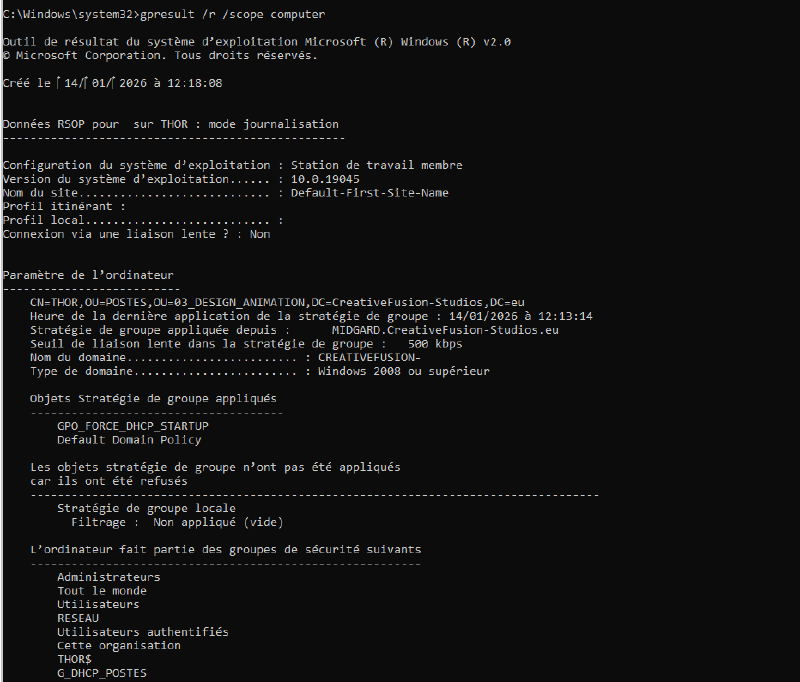
How I checked it. On THOR, gpupdate /force, then gpresult /r /scope computer as administrator: GPO_FORCE_DHCP_STARTUP is among the applied policies, and THOR is a member of G_DHCP_POSTES.
- InterfaceIndex (with a space) and -ResetServerAdresses. The script above is the corrected version. gpresult proves the GPO was applied, not that every line succeeded: the DHCP line was correct, the DNS line would have failed.Looking back#
The exam was about making things work. Looking back with a security mindset, here is what I would do differently.
My mistakes, kept on purpose
- A typo in the GPO script: the GPO applied, but one line would have failed. Lesson learned: a script gets tested by hand on one machine before a GPO pushes it to all of them.
- A wrong subnet mask on a router sub-interface (
255.255.255.255), caught by IOS:Bad mask /32 for address 10.0.40.254. A reminder to read the console output instead of firing commands blindly. - A switch backup that timed out, because the switch had no management IP. Obvious once understood: a layer-2 device needs an address to talk to anything.
What I would harden on a production network
| Point | In the exam | In production |
|---|---|---|
| LDAP between GLPI and AD | port 389, unencrypted | LDAPS (636) or StartTLS, so the service account password never crosses the network in clear text |
| GLPI default accounts | post-only, tech, normal still had default passwords | change or disable them right after installation |
| GLPI over HTTP | http://10.0.60.2 | HTTPS with a certificate from an internal CA |
| Config backups | FTP with clear-text credentials, required by the brief | SCP/SFTP, a dedicated account, versioned backups |
| Script launcher | -ExecutionPolicy Bypass | a signed script and an AllSigned policy |
| AD domain name | CreativeFusion-Studios.eu, a public TLD, imposed by the brief | a subdomain the company actually owns (e.g. ad.example.com), to avoid DNS conflicts with the real internet |
| Treating the symptom | a GPO resets static IPs at every boot | also remove standard users’ right to change network settings |
Tech stack#
Windows Server 2022 · Active Directory · DNS · DHCP · GPO · PowerShell · Debian 13 · Apache · PHP-FPM · MariaDB · GLPI 11 · LDAP · Cisco IOS · Packet Tracer